CI/CD Platform Integration with apifctl
apifctl has been deprecated and replaced with saucectl.
If you have any questions, contact your Customer Success Manager or Sauce Labs Support.
Execute API tests and interact with Sauce Labs API Testing (either locally or in a pipeline) using our API Testing CLI tool, apifctl.
Usage
You'll need to run our Docker image as a container:docker run --pull always quay.io/saucelabs/apifctl [COMMAND] [OPTIONS]
What You'll Need
- A Sauce Labs account (Log in or sign up for a free trial license).
- Your Sauce Labs Username and Access Key.
- An existing API Testing Project. For details on how to create one, see API Testing Quickstart.
Creating Webhooks
To utilize most apifctl CI/CD integration functionalities, you'll need to generate a webhook for your API Testing Project. Once generated, you add this webhook URL to your apifctl code to allow your third-party CI/CD app(s) to send data to Sauce Labs API Testing.
To generate a webhook:
-
Log in to Sauce Labs, then click API Testing.
-
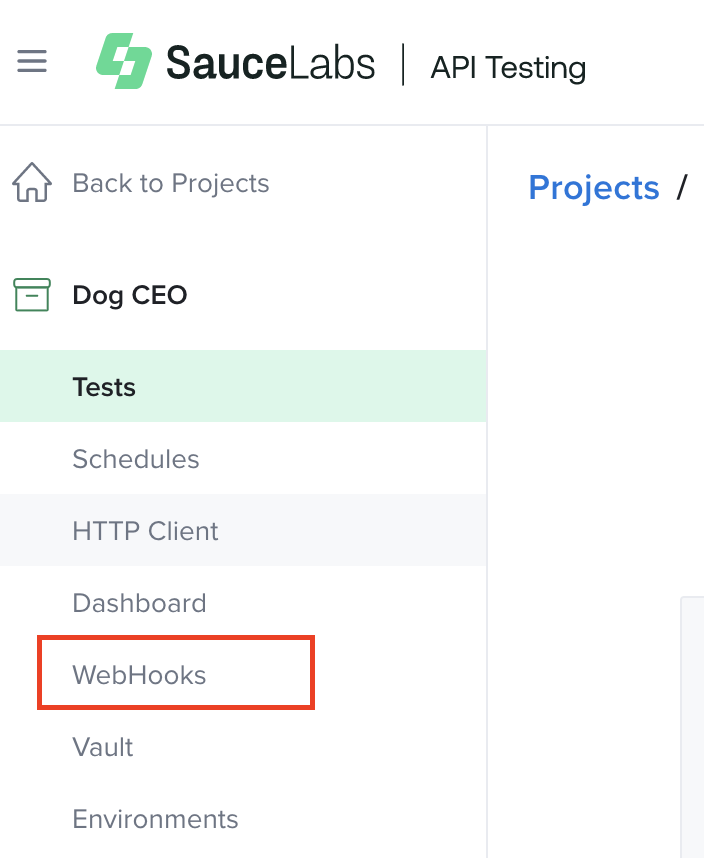
Navigate to your Project and select the WebHooks tab.
-
Select Create WebHook.
-
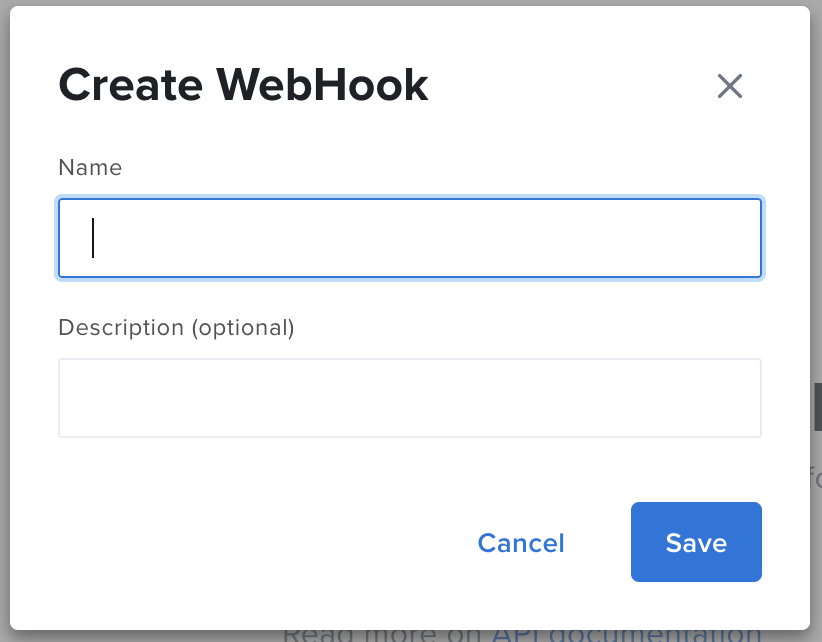
Enter a Name for your webhook (Description is optional), then click Save.
-
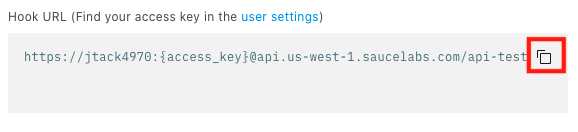
The generated Hook URL will then appear. Your Sauce Labs username, Sauce API Testing endpoint, and
{hook_id}will populate automatically. For security reasons, you'll need to add your own access key.https://{SAUCE_USERNAME}:{SAUCE_ACCESS_KEY}@{SAUCE_API_ENDPOINT}/{hook_id} -
Copy the URL to your clipboard and then you can use it either locally or as part of CI build.
You can then reuse this Webhook for future tests within that Project by returning to the Webhooks tab and copying it there. Webhooks are Project-specific.
apifctl Commands
run
Runs a single test, using hookId and testId. The testId is located in the URL when viewing the test through the API Testing UI (e.g., /api-testing/project/<projectId>/test/<testId>/).
docker run --pull always quay.io/saucelabs/apifctl run
Available Options:
-H <webhook>| REQUIRED | STRING |-i <test ID>| REQUIRED | STRING |-E <environment variable(s)>| OPTIONAL | STRING |-S <execute synchronously>| OPTIONAL |-T <tunnel ID>| OPTIONAL | STRING |-f <data format>| OPTIONAL | STRING |-b <build ID>| OPTIONAL | STRING |
docker run --pull always quay.io/saucelabs/apifctl run \
-H https://{SAUCE_USERNAME}:{SAUCE_ACCESS_KEY}@api.us-west-1.saucelabs.com/api-testing/rest/v4/{hookId} \
-i 123a1a123456a12345aa1aaa
run-all
Runs all the complete tests in the Project referenced by the hook.
docker run --pull always quay.io/saucelabs/apifctl run-all
Available Options:
-H <webhook>| REQUIRED | STRING |-E <environment variable(s)>| OPTIONAL | STRING |-S <execute synchronously>| OPTIONAL |-T <tunnel ID>| OPTIONAL | STRING |-f <data format>| OPTIONAL | STRING |-b <build ID>| OPTIONAL | STRING |
docker run --pull always quay.io/saucelabs/apifctl run-all -H \
https://{SAUCE_USERNAME}:{SAUCE_ACCESS_KEY}@api.us-west-1.saucelabs.com/api-testing/rest/v4/{hookId}
run-tag
Runs all the tests marked with a specific tag.
docker run --pull always quay.io/saucelabs/apifctl run-tag
Available Options:
-H <webhook>| REQUIRED | STRING |-tag <tag(s)>| REQUIRED | STRING |-E <environment variable(s)>| OPTIONAL | STRING |-S <execute synchronously>| OPTIONAL |-T <tunnel ID>| OPTIONAL | STRING |-f <data format>| OPTIONAL | STRING |-b <build ID>| OPTIONAL | STRING |
docker run --pull always quay.io/saucelabs/apifctl run-tag \
-H https://{SAUCE_USERNAME}:{SAUCE_ACCESS_KEY}@api.us-west-1.saucelabs.com/api-testing/rest/v4/{hookId} \
-tag production
exec
Sends a test residing in the local file system (directory with unit.xml and input.xml) to the cloud for execution.
docker run --pull always quay.io/saucelabs/apifctl exec
Available Options:
-H <webhook>| REQUIRED | STRING |-p <local path to test files>| REQUIRED | STRING |-E <environment variable(s)>| OPTIONAL | STRING |-f <data format>| OPTIONAL | STRING |-S <execute synchronously>| OPTIONAL |-T <tunnel ID>| OPTIONAL | STRING |-t <tags>| OPTIONAL | STRING |-n <name of test>| OPTIONAL | STRING |-b <build ID>| OPTIONAL | STRING |
docker run --pull always -v "$(pwd)/tests:/tests" quay.io/saucelabs/apifctl exec \
-H https://{SAUCE_USERNAME}:{SAUCE_ACCESS_KEY}@api.us-west-1.saucelabs.com/api-testing/rest/v4/{hookId} \
-p /tests/test_abc \
-n local_test \
-t product,production
upload
Uploads a local test residing in your local file system (directory with unit.xml and input.xml) to the cloud for storage.
docker run --pull always quay.io/saucelabs/apifctl upload
Available Options:
-H <webhook>| REQUIRED | STRING |-p <local path to test files>| REQUIRED | STRING |-n <name of test>| OPTIONAL | STRING |-t <tag(s)>| OPTIONAL | STRING |-d <test description>| OPTIONAL | STRING |
docker run --pull always -v "$(pwd)/tests:/tests" quay.io/saucelabs/apifctl upload \
-H https://{SAUCE_USERNAME}:{SAUCE_ACCESS_KEY}@api.us-west-1.saucelabs.com/api-testing/rest/v4/{hookId} \
-p /tests/test_abc \
-n local_test \
-t product
-d shoppingtransaction
vault-get
Displays the Project vault from the cloud.
docker run --pull always quay.io/saucelabs/apifctl vault-get
Available Options:
-H <webhook>| REQUIRED | STRING |
docker run --pull always quay.io/saucelabs/apifctl vault-get \
-H https://{SAUCE_USERNAME}:{SAUCE_ACCESS_KEY}@api.us-west-1.saucelabs.com/api-testing/rest/v4/{hookId} \
vault-update
It updates the Project vault on the cloud.
docker run --pull always quay.io/saucelabs/apifctl vault-update
Available Options:
-H <webhook>| REQUIRED | STRING |-p <local path to file>| OPTIONAL | STRING |-v <variables>| OPTIONAL | STRING |
docker run --pull always quay.io/saucelabs/apifctl vault-update \
-p /tests/vault/vault.json \
-v key=production,id=123
events
Displays all events of a Project.
docker run --pull always quay.io/saucelabs/apifctl events
Available Options:
-H <webhook>| REQUIRED | STRING |-f <from time>| OPTIONAL | STRING |-t <to time>| OPTIONAL | STRING |-l <limit>| OPTIONAL | INTEGER |-o <offset>| OPTIONAL | INTEGER |
docker run --pull always quay.io/saucelabs/apifctl events \
-H https://{SAUCE_USERNAME}:{SAUCE_ACCESS_KEY}@api.us-west-1.saucelabs.com/api-testing/rest/v4/36acf9c1-d5ad-4273-a233-a85470e1f502
-f 2021-12-31T14:00 \
-t 2021-12-31T15:00 \
-l 50 \
-o 10 \
event
Displays a specific event using its event ID.
docker run --pull always quay.io/saucelabs/apifctl event
Available Options:
-H <webhook>| REQUIRED | STRING |-i <event ID>| REQUIRED | STRING |
docker run --pull always quay.io/saucelabs/apifctl event \
-H https://{SAUCE_USERNAME}:{SAUCE_ACCESS_KEY}@api.us-west-1.saucelabs.com/api-testing/rest/v4/36acf9c1-d5ad-4273-a233-a85470e1f502
-i 123456789abc1a1abcdef123 \
metrics
Displays metrics of a Project.
docker run --pull always quay.io/saucelabs/apifctl metrics
Available Options:
-H <webhook>| REQUIRED | STRING |-f <from time>| OPTIONAL | STRING |-t <to time>| OPTIONAL | STRING |-l <limit>| OPTIONAL | INTEGER |-o <offset>| OPTIONAL | INTEGER |
docker run --pull always quay.io/saucelabs/apifctl metrics \
-H https://{SAUCE_USERNAME}:{SAUCE_ACCESS_KEY}@api.us-west-1.saucelabs.com/api-testing/rest/v4/36acf9c1-d5ad-4273-a233-a85470e1f502
-f 2021-12-31T14:00 \
-t 2021-12-31T15:00 \
-l 50 \
-o 10 \
apifctl Options
-H <webhook>
| STRING |
Specifies the webhook URL. This option is required for all commands.
-H https://{SAUCE_USERNAME}:{SAUCE_ACCESS_KEY}@{SAUCE_REST_API_URL}/{hookId}
-E <environment variable(s)>
| STRING |
Sets environment variables with your command. Enter your variables as a comma-separated list. For use with the run, run-all, run-tag, exec commands.
-E domain=staging.example.com,id=123
-S
Syncs execution so that apifctl will wait until all results are available, and then prints them. For use with the run, run-all, run-tag, and exec commands.
-f <data format>
| STRING |
Sets the data format to one of two possible values: json or junit. Default is json. For use with the run, run-all, run-tag, exec commands.
-f junit
-T <tunnel ID>
| STRING |
Specifies your tunnel ID for running tests using Sauce Connect Proxy. For use with the run, run-all, run-tag, exec commands.
Parameters for -T | |
<username>:<tunnelName> | | OPTIONAL | STRING | In case of shared tunnels, tunnel names may have duplicates, therefore you can provide an explicit owner to exactly identify which tunnel (e.g., |
<tunnelName> | | OPTIONAL | STRING | Also known as "tunnel-identifier" in the Sauce Connect world. That's a named tunnel. This is the suggested way to use the tunnels (e.g., |
<anonymous> | | OPTIONAL | STRING | If you start an unnamed tunnel, you can use anonymous (using the same user's credentials) to use the first unnamed tunnel available. This is not recommended and SC support of this mode for the future is uncertain (e.g., |
<tunnelId> | | OPTIONAL | STRING | The unique id of the tunnel. Generally used with unnamed tunnels. For the same reason as the previous mode, this is not recommended (e.g., |
-p <local path to file>
| STRING |
For the exec and upload commands: This is the local path to the folder containing both your unit.xml and input.xml test files. In the below example, product_update is the folder containing unit.xml and input.xml.
-p /tests/product_update
For the vault-update command: This is the local path to the folder containing your Vault file.
-p /tests/vault/vault.json
-f <from time>
| STRING |
Identifies the start date of the events you want to see. For use with the metrics and events commands.
-f 2021-10-21T14:00
-t <to time>
| STRING |
Identifies the end date of the events you want to see. For use with the metrics and events commands.
-t 2021-10-31T15:00
-t <tag(s)>
| STRING |
Adds a set of tags to the test. Format as a comma-separated list of tags you want to assign to the test. For use with the exec and upload commands.
-t product,production
-tag <tag(s)>
| STRING |
The run-tag command will run all the tests in your Project marked with that tag. For use with the run-tag command only. The example below will run all the tests in the Project labeled with the product and production tags.
-tag product,production
-n <name of test>
| STRING |
Identifies the name of the test you want to assign to. Default is the name of the test directory. For use with the exec and upload commands.
-n local_test
-i <test ID>
| STRING |
Identifies the ID of a complete test. For use with the run command only. To find a test ID, go to a test, open Compose, then it will appear in your browser URL --> /api-testing/project/{project_id}/test/{test_id}/compose.
-i 123a1a123456a12345aa1aaa
-i <event ID>
| STRING |
Identifies the ID of the event you want to see. For use with the event command only. You can find an event ID from the “events” response payload.
-i 123456789abc1a1abcdef123
-b <build ID>
| STRING |
Adding this parameter allows you to specify the build ID you want to run your tests against. For use with the run, run-all, run-tag, and exec commands. For more information, see Test Builds.
-b build-12345
-d <test description>
| STRING |
The description you want to add to your test. For use with the upload command only.
-d shoppingtransaction
-v <variables>
| STRING |
Format as key=value. To add multiple variables, enter them as a comma-separated list. For use with the vault-update command only.
-v key=production,id=123
-l <limit>
| INTEGER |
Identifies the maximum number of metrics and events to be shown in the list. Default value is 100. For use with the events and metrics commands.
-l 50
-o <offset>
| INTEGER |
Specifies the number of events and metrics to be skipped from the beginning of the list. Default value is 0. For use with the events and metrics commands.
-o 10